Skip to content

[tl] Image Optimizer for Xenforo 2.2.0

(0 reviews)

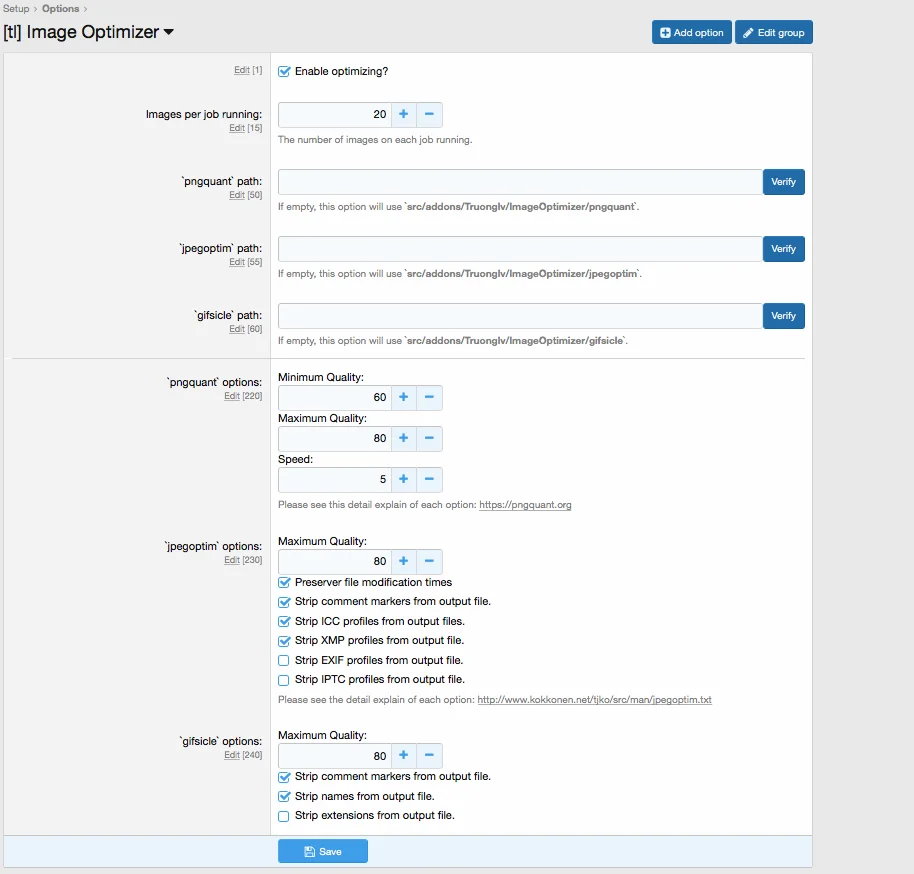
1 Screenshot

  • 插件在 ACP 选项中提供了强大的设置。在运行优化图像之前,您必须先设置这些选项。

  • 所有文件都将被覆盖,然后您无法将文件恢复为原始文件。

描述
: 优化存储在 XenForo 中的所有图像,使其尺寸更小且不损失质量。

特点:

  • 能够配置每个库的压缩选项

  • 限制每个运行作业的项目数。

  • 日志页面显示所有图像均已压缩

  • 在选项页面中运行检查库。

支持:

  • XenForo 默认附件

  • 图片代理缓存

What's New in Version 2.2.0

Released

No changelog available for this version.

User Feedback

There are no reviews to display.


© Copyright 2021-2025 okscc.com All rights reserved. 豫ICP备2024089627号 Icon 豫公网安备41030402000232
Disclaimer: This website does not store any video content or materials; it only provides links to files. The purpose is to convey more information and does not imply endorsement of their views or responsibility for their accuracy.

Account

Navigation

Search

Search

Configure browser push notifications

Chrome (Android)
  1. Tap the lock icon next to the address bar.
  2. Tap Permissions → Notifications.
  3. Adjust your preference.
Chrome (Desktop)
  1. Click the padlock icon in the address bar.
  2. Select Site settings.
  3. Find Notifications and adjust your preference.